Windows Tutorial Tips and Trick

Interesting and useful Windows windows 7, windows Vista, windows XP Tutorial Tips and Trick..

This is default featured slide 2 title

Go to Blogger edit html and find these sentences.Now replace these sentences with your own descriptions.

This is default featured slide 3 title

Go to Blogger edit html and find these sentences.Now replace these sentences with your own descriptions.

This is default featured slide 4 title

Go to Blogger edit html and find these sentences.Now replace these sentences with your own descriptions.

This is default featured slide 5 title

Go to Blogger edit html and find these sentences.Now replace these sentences with your own descriptions.

Showing posts with label Google. Show all posts

Google Drive: yes it's finally live


Image courtesy of tech2.in.com
finally At 09:30 am PST that the drive.google.com website went live. we only know that users get 5 GB of space on Google Drive for free, and can purchase extra space, as needed. The service integrates with Linux, Mac, and Windows, in much the same way as Dropbox does. There are mobile apps for Android and iOS (coming soon), and, of course, you need a Google account to use the service.

Access everywhere.
Google Drive is everywhere you are on the web, in your home, at the office and on the go. So wherever you are, your stuff is just...there. Ready to go, ready to share. Get started with 5 GB free.

Google Drive is available for:

  • PC and Mac
  • iPhone and iPad (coming soon)
  • Android devices

Go beyond storage. Collaborate.
Google Drive lets you do more than just store your files. Share files with exactly who you want and edit them together, from any device.

Google Drive gives you instant access to Google Docs, a suite of editing tools that makes working together bettereven when your teammates are miles away


There’s so much more to explore about Google’s latest service, and we’re as excited to find out more as you are.

So many diseases with similar symptoms, I think this won’t much help?


So many people in the US search for health information on a monthly basis; Google has seen these queries up close and recently concluded that it this won’t much help of servicing them. Google introducing improved results that shortens the time from symptom-related search to discovery of potential medical causes and conditions
Google Chief Health Strategist Roni Zeiger, MD, explains in an insidesearch blog post announcing the new symptom-related search results:
“To make the process easier, now when you search for a symptom or set of symptoms, you'll often see a list of possibly related health conditions that you can use to refine your search. The list is generated by our algorithms that analyze data from pages across the web and surface the health conditions that appear to be related to your search”

Before


After


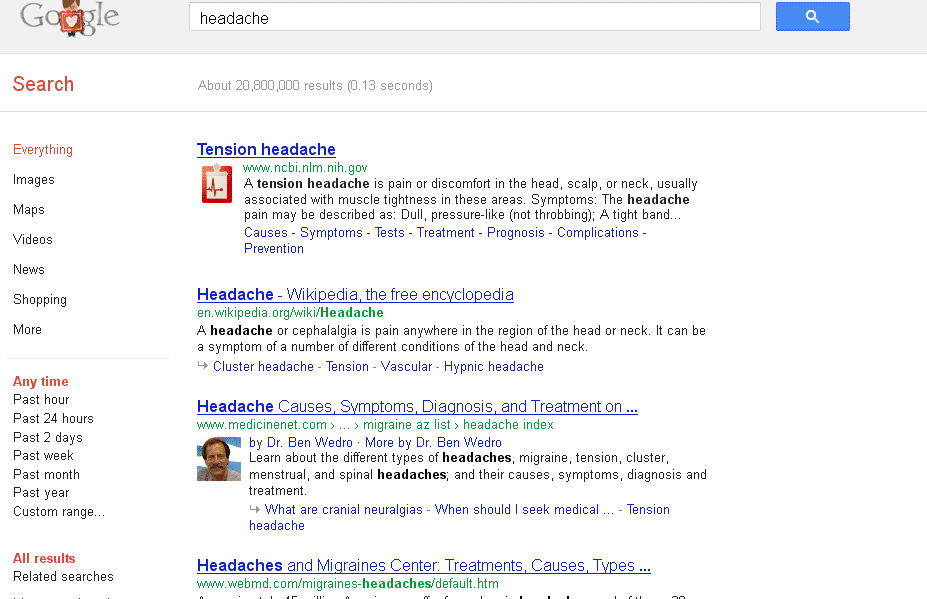
For example, if you search for [headache], you’ll be able to quickly see some potentially related conditions and learn more about them by clicking on the links in the list.
The list of health conditions you see is aggregated from what’s written on the web about the symptoms you searched. The list is not authored by doctors and of course is not advice from medical experts.
"Does this will much help considering that so many diseases with similar symptoms?"

Set Up Chrome with Your Google Account


You can save your bookmarks, extensions, apps, theme, and browser preferences to your Google Account so that they are available on any computer you’re using. That way, you can have the same web experience everywhere. When you sign in to Chrome, your Google Chrome settings on that computer are saved to your Google Account. When you sign in to the same account on another computer, Google Chrome makes your saved settings available on that computer. Any changes you make to your browser settings will be synced to the Google Account you've used to sign in to Chrome. Changes you make on one computer are automatically reflected on the other computers where you're signed in and have enabled sync. To keep your information secure, synced data is encrypted when it travels between your computer and Google’s servers. As an added layer of protection, by default your saved passwords are encrypted on your computer and on Google’s servers using a cryptographic key. You also have the option to encrypt all your synced data. You can remove your synced data from your Google Account at any time,


Remember; do not set up Chrome with your Google Account on a public or untrusted computer. When you set up Chrome with your Google Account, a copy of your data is stored on the computer you're using and can be accessed by other users on the same computer. To remove your data, delete the user you are signed in as.
This article applies to Google Chrome on Windows, Mac, Linux, and Chrome OS.

January Google’s Search Update: Panda algorithm update, Fresher results, Faster autocomplete and more...


Google has decided to push out its monthly update of search tweaks from the prior month. Here’s the latest installment of the January update is out and it contains a few interesting thing.
  • Fresher results. [launch codename “nftc”] We made several adjustments to the freshness algorithm that we released in November. These are minor updates to make sure we continue to give you the freshest, most relevant results.
  • Faster autocomplete. [launch codename “Snappy Suggest”, project codename “Suggest”] We made improvements to our autocomplete system to deliver your predicted queries much faster.
  • Autocomplete spelling corrections. [launch codename “Trivial”, project codename “Suggest”] This is an improvement to the spelling corrections used in autocomplete, making those corrections more consistent with the spelling corrections used in search. This launch targets corrections where the spelling change is very small.
  • Better spelling full-page replacement. [launch codenames “Oooni”, “sgap”, project codename “Full-Page Replacement”] When we’re confident in a spelling correction we automatically show results for the corrected query and let you know we’re “Showing results for [cheetah]” (rather than, say, “cheettah”). We made a couple of changes to improve the accuracy of this feature.
  • Better spelling corrections for rare queries. This change improves one of the models that we use to make spelling corrections. The result is more accurate spell corrections for a number of rare queries.
  • Improve detection of recurrent event pages. [launch codename “neseda”] We made several improvements to how we determine the date of a document. As a result, you’ll see fresher, more timely results, particularly for pages discussing recurring events.
  • High-quality sites algorithm improvements. [launch codenames “PPtl” and “Stitch”, project codename “Panda”] In 2011, we launched the Panda algorithm change, targeted at finding more high-quality sites. We improved how Panda interacts with our indexing and ranking systems, making it more integrated into our pipelines. We also released a minor update to refresh the data for Panda.
  • Cross-language refinements. [launch codename Xiangfan] Previously, we only generated related searches based on the display language. With this change, we also attempt to auto-detect the language of the original query to generate related search queries. Now, a user typing a query in French might see French query refinements, even if her language is set to English.
  • English on Google Saudi Arabia. Users in Saudi Arabia can now more easily choose an English interface to search on google.com.sa.
  • Improved scrolling for Image Search. Previously when you scrolled in Image Search, only the image results would move while the top and side menus were pinned in place. We changed the scrolling behavior to make it consistent with our main search results and the other search modes, where scrolling moves the entire page.
  • Improved image search quality. [launch codename “endearo”, project codename “Image Search”] This is a small improvement to our image search ranking algorithm. In particular, this change helps images with high-quality landing pages rank higher in our image search results.
  • More relevant related searches. Sometimes at the bottom of the screen you’ll see a section called “Searches related to” with other queries you may want to try. With this change, we’ve updated the model for generating related searches, resulting in more useful query refinements.
  • Blending of news results. [launch codename “final-destination”, project codename “Universal Search”] We improved our algorithm that decides which queries should show news results, making it more responsive to realtime trends. We also made an adjustment to how we blend news results in Universal Search. Both of these changes help news articles appear in your search results when they are relevant.
  • Automatically disable Google Instant based on computer speed. [project codename “Psychic Search”] Google Instant has long had the ability to automatically turn itself off if you’re on a slow internet connection. Now Instant can also turn itself off if your computer is slow. If Instant gets automatically disabled, we continue to check your computer speed and will re-enable Instant if your performance improves. We’ve also tweaked search preferences so you can always have Instant on or off, or have it change automatically.

That’s a quick overview of about half of the January tweaks on Google’s algorithm update,full list on Google’s Inside Search blog.

Google Penalize Heavy Pages with lot of ads “Above the Fold” By Google’s “Page Layout” Algorithm


Ever encountered an ad-heavy page, where you struggle to find the actual content on that page? Google’s penalizing those in its search results.
The change called the “page layout algorithm” takes direct aim at any site with pages where content is buried under tons of ads.

“We’ve heard complaints from users that if they click on a result and it’s difficult to find the actual content, they aren’t happy with the experience. Rather than scrolling down the page past a slew of ads, users want to see content right away. So sites that don’t have much content “above-the-fold” can be affected by this change. If you click on a website and the part of the website you see first either doesn’t have a lot of visible content above-the-fold or dedicates a large fraction of the site’s initial screen real estate to ads, that’s not a very good user experience. Such sites may not rank as highly going forward.”

Many already assume that Google’s Panda algorithm is already penalizing ad heavy pages. These suggest that this either is not part of the Panda algorithm or that it might be made a separate and more specific algorithm in the works.
But how far the page is too much in ads? That’s left to the publisher to decide for themselves. However, the blog post stresses the change should only hit pages with an abnormally large number of ads above-the-fold, compared to the web as a whole
Impacts of “Page Layout Algorithm” Less Than 1% of Searches. For publisher, I think you’re in trouble if you have little or even no content and showing above the fold ads for commonly-used screen resolutions. You’ll know you’re in trouble shortly, because the change is now going into effect. If you suddenly see a drop in traffic today, and you’re heavy on the ads, chances are you’ve been hit by the new algorithm. Fixed Your Ads, Penalty Doesn’t Lift Immediately.
But something ironically that Google’s AdSense team encouraging just the opposite of that :)

How to creating Autoresponder with Gmail


If you've ever sent an email to support Team, most likely you received an automatic reply vaguely related to your message. Using a new feature from Gmail Labs, you can create your own Autoresponder with canned messages feature in Gmail and use them as automatic replies.
If you're bored of typing out the same email reply every time someone emails you with a common question, now you can compose your reply once and save the message text with the "Canned responses" button. Later, you can open that same message and send it again and again.
Canned feature in Gmail added a new action for filters: "send canned response". If you receive many messages about the same issue and you have a standard response, create a filter that includes some relevant keywords and select an existing canned response. This should come in handy if some users continue to ask same question repeatedly.

How to creating Autoresponder with Gmail:
First Login to your Gmail account
Go to setting and click tab Labs and check to enable Canned Responses feature than save it.

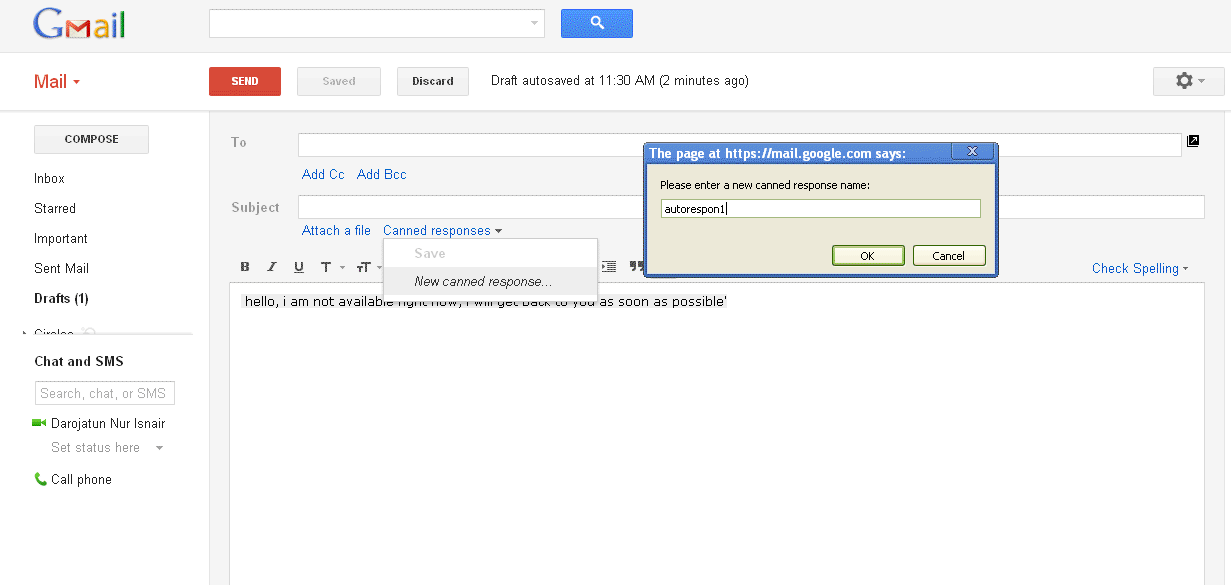
Compose new email for your autoresponde, its culd be like “hello, I am not available right now, I will get back to you as soon as possible'”
Click on Canned Responses and create new Canned Responses and type a name for your first auto responder such as “autorespon1”than save it


Now back again to Gmail setting, on tab filter than click create new filter write down your subject keywords or has the words. Then click Create filter with this search


Then check the Send canned response, chose your Autoresponder replay and click create filter.
All done now you have your own free Autoresponder with your own Gmail account. Every time you got an email with subject or has word match with your filter GMail will automatically answer it’s for you